
Azure Proxy Server Guide: Secure Access Strategies for 2025
As organizations accelerate their cloud adoption in 2025, secure and reliable access to resources is more critical than ever. Without the right safeguards, even the most robust cloud platform can be vulnerable.
This is where an azure proxy server comes into play, helping IT teams manage, secure, and optimize connectivity across their Azure environments. Staying ahead of threats and compliance changes means using strategies built for today’s evolving challenges.
In this guide, you’ll find actionable, future-ready solutions for deploying and managing azure proxy server infrastructure. We’ll cover proxy server fundamentals, deployment models, security strategies, step-by-step configuration, troubleshooting, and the latest trends shaping Azure connectivity.
Understanding Azure Proxy Servers: Fundamentals and Use Cases
In 2025, organizations are increasingly relying on the azure proxy server to secure, control, and optimize their cloud environments. But what exactly is an azure proxy server, and why is it so crucial for IT teams managing Azure resources?
What Is an Azure Proxy Server?
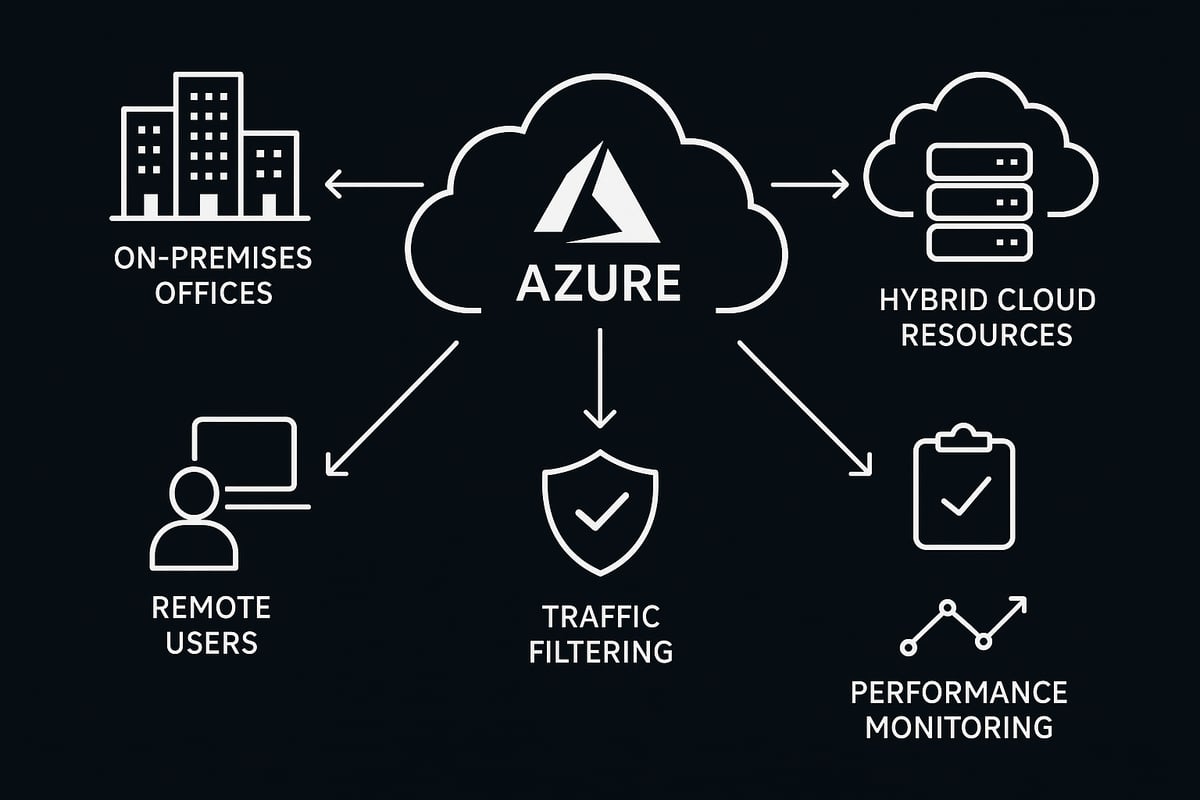
An azure proxy server acts as an intermediary between users or devices and Azure cloud services. It handles requests, forwards them to Azure resources, and returns responses to clients. This adds a layer of abstraction that enhances security, enforces policies, and helps manage connectivity.
The azure proxy server is commonly used to hide client IP addresses, control access, and provide logging for compliance. Within the Azure ecosystem, proxies play a vital role in enforcing security boundaries and supporting regulatory requirements.
Types of Proxy Servers in Azure Environments
There are several types of proxy servers that administrators might deploy in Azure environments:
- Forward proxies: Positioned between users and the internet, these proxies manage outbound traffic, enforce content filtering, and provide user anonymity.
- Reverse proxies: Placed in front of web servers, they manage inbound traffic, load balancing, SSL termination, and application-level security.
- Transparent proxies: Operate without client configuration, intercepting traffic automatically for filtering or monitoring.
Choosing the right azure proxy server type depends on your specific business and security needs. For a more detailed breakdown of these proxy types and their supported protocols, check out this helpful Supported Proxy Types and Protocols guide.
Azure Proxy Server Use Cases
The azure proxy server unlocks a range of use cases tailored to cloud-first organizations, including:
- Secure remote access: Enable employees to work safely from anywhere by routing connections through a trusted proxy.
- Regulatory compliance: Ensure traffic is logged, monitored, and filtered to meet frameworks like GDPR and HIPAA.
- Traffic monitoring and analytics: Gain visibility into user activity and detect anomalies or threats.
- Content filtering: Block malicious or non-compliant websites to protect users and data.
- Hybrid cloud connectivity: Bridge on-premises networks and Azure resources securely.
These use cases become even more important as remote work and hybrid cloud adoption continue to rise.
How Proxy Servers Interact with Azure Services
The azure proxy server integrates with a wide array of Azure services, including Azure Virtual Desktop, Azure Portal, and REST APIs. For instance, proxies can be configured to control access to Virtual Desktop agents or filter web access to the Azure Portal.
However, it is crucial to ensure your azure proxy server supports required protocols such as HTTP, HTTPS, WebSocket, and RDP. Microsoft notes that proxies can introduce latency or disrupt long-lived connections (like WebSocket sessions), which may impact user experience in services like Azure Virtual Desktop.
Performance, Examples, and Key Insights
While an azure proxy server can significantly boost security and compliance, it can also affect network performance if not carefully planned. Proxies may add latency, especially if they are not located near Azure resources or if they inspect large volumes of encrypted traffic.
Examples of effective proxy use in Azure:
- Financial institutions use proxies to monitor and control access for regulatory audits.
- Remote workforces rely on proxies to safely access Azure resources from unmanaged devices.
- Hybrid cloud scenarios benefit from proxies that bridge on-premises and cloud networks.
Industry statistics show that over 70% of large enterprises deploying Azure use some form of proxy to secure cloud access. The key insight is that while proxies are invaluable for security, they require thoughtful configuration to avoid performance bottlenecks and compatibility issues.
Azure Proxy Server Deployment Models and Architecture
As organizations embrace cloud-first strategies, understanding the architecture and deployment models for an azure proxy server is essential. The right deployment can impact everything from security posture to performance and user experience.
Proxy Server Placement: Cloud, On-Premises, and Hybrid
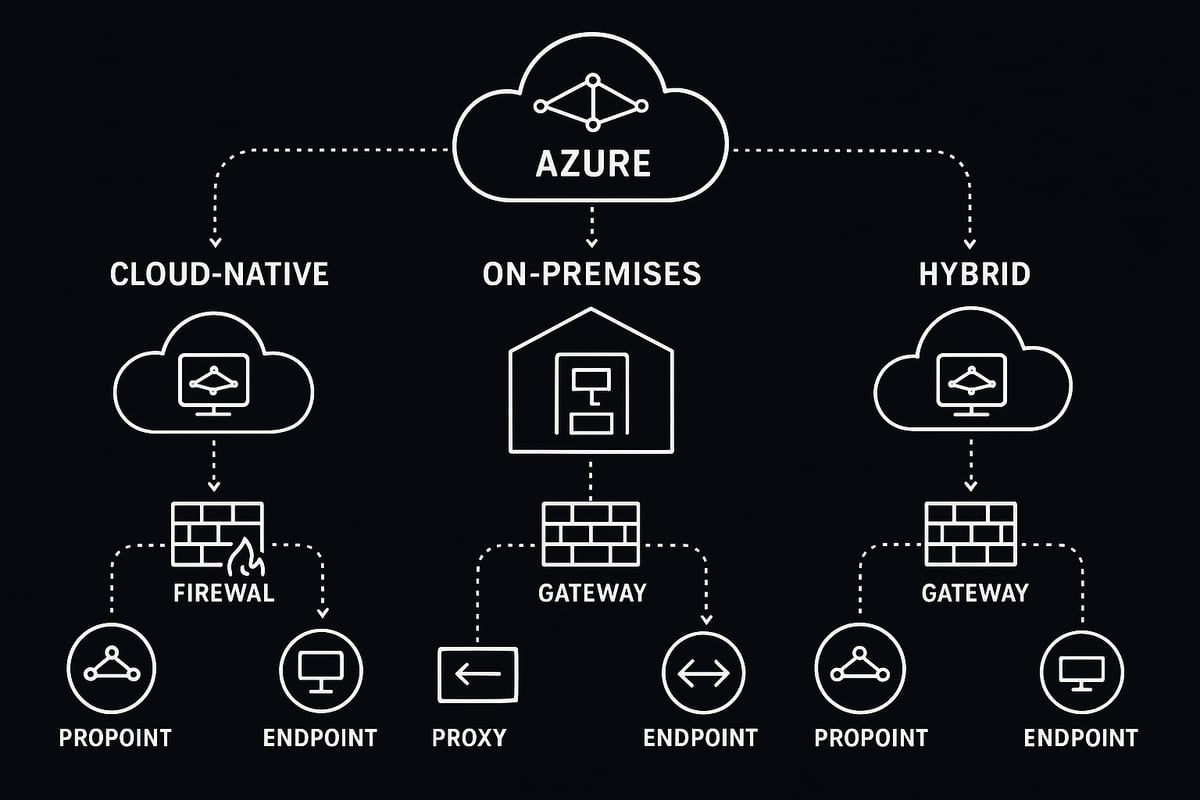
Choosing where to deploy your azure proxy server shapes your network’s security and agility. There are three main placement options:
- Cloud-native proxies: Deployed directly within Azure, using services like Azure Application Gateway, Azure Firewall, or Azure Front Door. These solutions natively integrate with Azure services and scale with cloud workloads.
- On-premises proxies: Traditional proxy appliances or software located within your data center. These are often used for legacy systems, tight regulatory controls, or to maintain centralized traffic inspection.
- Hybrid models: Combine both, enabling flexible routing based on user location, workload type, or compliance needs.
Here’s a quick comparison:
| Model | Pros | Cons |
|---|---|---|
| Cloud-native | Easy to scale, integrated, low latency | May lack control for legacy apps |
| On-premises | Full control, supports legacy needs | Potential for higher latency, complex |
| Hybrid | Flexible, tailored for each use case | More management overhead |
For a deeper dive into network architecture, see the Azure Application Proxy Network Topology documentation, which provides diagrams and deployment considerations for various proxy placements.
Supported Protocols, Authentication, and Traffic Routing
An azure proxy server must support a range of protocols and authentication methods to function effectively in modern cloud environments.
Supported protocols:
- HTTP and HTTPS for web traffic
- SOCKS for non-HTTP applications
- WebSocket for real-time services (note: some Azure services, like Azure Virtual Desktop, require careful handling of WebSocket connections)
Authentication methods:
- NTLM and Kerberos for enterprise integration
- Basic authentication for simple use cases
- OAuth for modern, token-based access control
When routing traffic, ensure your azure proxy server can handle Azure-specific requirements, such as RDP for Virtual Desktop, REST APIs for management, and custom endpoints. Microsoft recommends reviewing protocol limitations - some services require TCP, while others may not support UDP through proxies. Always verify compatibility before deploying in production.
Scalability, Redundancy, and Performance Optimization
Scaling your azure proxy server is critical as your Azure footprint grows. Start by sizing proxies to handle expected peak workloads, and plan for horizontal scaling using load balancers or Azure-native scaling features.
Redundancy strategies:
- Deploy proxies in multiple availability zones or regions to ensure high availability.
- Use load balancing to distribute traffic and provide failover in case of outages.
- Geo-placement can reduce latency by positioning proxies closer to Azure resources or end users.
Performance optimization focuses on reducing network latency and ensuring seamless access. For example, placing your azure proxy server in the same Azure region as your Virtual Desktop agents can significantly improve user experience. Regularly monitor traffic patterns and adjust proxy placement as needed to maintain optimal performance.
Best practices also include:
- Monitoring proxy health and resource utilization
- Regularly updating proxy software for security and compatibility
- Documenting architecture decisions for compliance and troubleshooting
A well-architected azure proxy server deployment not only secures your Azure environment but also supports growth and adapts to evolving business needs.
Security Strategies for Azure Proxy Servers in 2025
Securing access to cloud resources is crucial as organizations rely more on the azure proxy server to protect sensitive data. The landscape of threats continues to evolve, and compliance demands are tightening. IT teams must stay vigilant and adapt their security strategies to ensure robust protection for Azure environments.

Threat Landscape and Compliance Drivers
The azure proxy server is often a primary target for attackers seeking to breach cloud access points. Modern threats include credential theft, session hijacking, and man-in-the-middle attacks. Attackers exploit weak configurations or outdated software to gain unauthorized access.
Compliance is another major driver for security. Regulatory frameworks such as GDPR, HIPAA, and PCI DSS require strict controls over data in transit and audit trails. The azure proxy server must support detailed logging and align with zero-trust principles to help organizations meet these mandates.
Key compliance requirements include:
- Encryption of all sensitive data
- User activity logging and monitoring
- Regular access reviews and policy updates
Adopting these practices ensures that the azure proxy server not only guards against evolving threats but also keeps organizations audit-ready.
Encryption, Authentication, and Access Controls
Strong encryption is a non-negotiable aspect of any azure proxy server deployment. Enforcing SSL or TLS on all proxy traffic shields data from interception. Multi-factor authentication (MFA) adds an extra layer by verifying user identity before granting access.
Integrating proxy authentication with Azure Active Directory allows for centralized identity management. Role-based access control (RBAC) ensures that only authorized personnel can administer the azure proxy server, minimizing the risk of insider threats.
For a deeper dive into up-to-date recommendations, consult the Azure Security Best Practices 2025, which outlines current strategies for securing proxy configurations and managing access controls.
Network Segmentation, Service Tags, and FQDN Filtering
Effective network segmentation is essential for limiting exposure. The azure proxy server should leverage Azure service tags, which simplify access control by grouping related endpoints. This approach allows administrators to restrict traffic to only what is necessary for business operations.
Fully Qualified Domain Name (FQDN) filtering is another best practice. By allowing only approved Azure endpoints through the azure proxy server, organizations can prevent data leakage and unauthorized access. Microsoft recommends bypassing proxies for certain services, such as Azure Virtual Desktop, to maintain optimal performance.
Consider these steps for improved segmentation:
- Use service tags in network security groups
- Implement FQDN allow-lists for critical applications
- Regularly review and update filtering policies
Logging, Monitoring, and Incident Response
Comprehensive logging is a cornerstone of azure proxy server security. All access and configuration changes should be recorded and sent to centralized tools like Azure Monitor or Sentinel for real-time analysis.
Proactive monitoring helps detect anomalous behavior, such as unusual login attempts or traffic spikes. When incidents occur, having a clear response plan is vital. Quick access to detailed logs enables rapid forensics and containment.
A typical incident response workflow includes:
- Alerting on suspicious proxy activity
- Isolating affected endpoints
- Conducting root cause analysis
- Updating security policies to prevent recurrence
Regularly reviewing logs and simulating incident scenarios will keep your azure proxy server defenses sharp.
Proxy Bypass and Exception Management
Not all Azure services are proxy-friendly, so exception management is necessary. Methods like Proxy Auto-Configuration (PAC) files and bypass lists allow specific traffic to circumvent the azure proxy server when required.
However, bypassing proxies introduces risk. Critical services should only be excluded after careful evaluation. For instance, ensuring direct access to the Azure portal is vital for management continuity.
Best practices for proxy bypass include:
- Maintaining an up-to-date bypass list
- Limiting exceptions to trusted endpoints
- Monitoring bypassed traffic for anomalies
A well-managed azure proxy server balances strict security with the flexibility needed for seamless Azure service access.
Step-by-Step Guide: Configuring Azure Proxy Servers for Secure Access
Configuring an azure proxy server is a vital step for ensuring secure, efficient access to cloud resources. This guide walks you through each phase, from preparation to ongoing maintenance, so your Azure environment is ready for 2025 and beyond.

Preparing Your Azure Environment
Before deploying an azure proxy server, map out your current network topology. Identify which users, devices, and applications require access to Azure services. This step prevents misconfigurations and ensures only necessary traffic is routed through your proxy.
Next, gather the latest list of Azure service endpoints. Microsoft regularly updates its safelist URLs for the Azure Portal, Azure Virtual Desktop, and REST APIs. Having an up-to-date endpoint inventory is crucial for your azure proxy server to function seamlessly.
Check for compatibility with Azure features like WebSocket, RDP Shortpath, and hybrid connectivity. Not all proxies support every protocol, so verify that your chosen solution meets Azure’s requirements. This proactive approach reduces the risk of disruptions when you go live.
Deploying and Integrating Proxy Solutions
Deploying your azure proxy server can involve Azure-native solutions like Application Gateway or third-party proxy appliances. Start by provisioning your chosen proxy within the proper network segment, ideally close to your Azure resources for minimal latency.
Configure Network Security Groups (NSGs) to restrict traffic to and from your azure proxy server. Leverage Azure Firewall with service tags for granular control. This setup ensures that only authorized communication reaches your Azure workloads.
Integrate proxy authentication with Azure Active Directory for seamless single sign-on. Choose authentication methods that align with your organization’s security policies, such as OAuth, Kerberos, or NTLM. Proper integration strengthens your azure proxy server’s defense against unauthorized access.
If your architecture requires high availability, set up load balancing and redundancy. Geo-placement of proxies can further enhance performance and reliability for distributed teams.
Configuring Proxy Bypass and Exceptions
To optimize performance and avoid bottlenecks, configure proxy bypass for traffic that does not require inspection or filtering. Many Azure services, like Azure Virtual Desktop, perform best when RDP traffic bypasses the azure proxy server.
Use PAC (Proxy Auto-Configuration) files to automate dynamic proxy rules. Here’s a sample PAC file snippet:
function FindProxyForURL(url, host) {
  if (shExpMatch(host, "*.azure.com")) {
    return "DIRECT";
  }
  return "PROXY proxy.company.com:8080";
}
Maintain a bypass list for critical Azure endpoints based on Microsoft’s recommendations. Regularly review and update these lists as Azure evolves. For a deeper dive into effective strategies, explore Proxy Bypass Methods Explained.
Always document exceptions and communicate changes to your IT team. This transparency ensures compliance and minimizes troubleshooting headaches.
Validating Connectivity and Security
After configuration, test connectivity to all required Azure services through your azure proxy server. Use diagnostic tools provided by Azure to verify access paths and confirm that security policies are enforced.
Validate that all authentication flows work as intended. Check that SSL/TLS encryption is active for all proxy traffic. If issues arise, consult Azure’s self-diagnostic utilities to pinpoint and resolve configuration errors.
Regularly review access logs for anomalies. A well-configured azure proxy server should provide both smooth user experience and robust security.
Maintenance and Updates
Keeping your azure proxy server up-to-date is essential for long-term reliability. Schedule regular updates for proxy software and security rules. Monitor Microsoft’s official documentation for changes to Azure service endpoints or protocol requirements.
Document every configuration change, including updates to PAC files, bypass lists, and firewall rules. This practice supports audit readiness and helps your team recover quickly in the event of an incident.
Set up automated monitoring to detect performance issues or security threats. Proactive maintenance ensures your azure proxy server continues to deliver secure, uninterrupted access as your organization grows.
Troubleshooting and Limitations of Azure Proxy Servers
As organizations rely more on cloud solutions, troubleshooting and understanding the limitations of any azure proxy server implementation becomes essential for IT teams. Proxies can introduce unique challenges in Azure environments, making proactive problem-solving a vital skill.
Common Issues with Azure Proxy Servers
Administrators often encounter several recurring problems with an azure proxy server setup. Connection instability is a top concern, especially when dealing with intermittent drops or timeouts during peak usage. High latency can degrade the user experience, making applications sluggish or unresponsive.
Authentication failures are another frequent issue. These can arise from misconfigured credentials, unsupported protocols, or mismatches between proxy and Azure authentication methods. Additionally, some services may not support certain types of proxies, leading to failed connections or degraded performance.
Limitations for WebSocket and Specific Azure Services
A significant limitation of the azure proxy server is its handling of long-running WebSocket connections. Microsoft specifically cautions that not all proxies are compatible with persistent connections, which are crucial for services like Azure Virtual Desktop or real-time applications.
Some Azure services, such as the Azure Portal or REST APIs, may require special routing or direct connectivity to function optimally. If the proxy does not support necessary protocols or fails to handle large, sustained sessions, users might experience disconnects or incomplete data transfers.
Diagnosing and Resolving Proxy-Induced Problems
When troubleshooting an azure proxy server, start by reviewing detailed logs from both the proxy and Azure resources. Look for patterns in connection drops, timeouts, or authentication errors. PAC files and bypass lists should be checked to ensure critical services are not inadvertently routed through incompatible proxies.
Network routes and DNS resolution can also impact connectivity. Adjusting these settings may resolve obscure issues with endpoint reachability. For step-by-step guidance, consult Troubleshooting Proxy Connectivity Issues for practical troubleshooting workflows tailored to proxy environments.
Latency and Performance: Real-World Example
Latency is a common challenge with an azure proxy server, especially when proxies are placed far from Azure resources. For example, if Azure Virtual Desktop agents are forced to route traffic through an offsite proxy, the round-trip time increases, resulting in noticeable lag for end users.
To mitigate this, always consider the geographic placement of your proxies relative to Azure services. Placing proxies in the same region as your cloud workloads can significantly reduce latency and improve overall performance.
Support Boundaries and Microsoft Guidance
Not all Azure services are designed to work seamlessly with every type of azure proxy server. Microsoft recommends bypassing proxies for certain traffic, such as Azure Virtual Desktop RDP connections, to avoid compatibility issues and ensure optimal performance.
Advanced features, like the Azure Firewall Explicit Proxy Feature, can help bridge some of these gaps by providing more granular control and visibility. However, be aware of each solution’s limitations and always validate compatibility with your specific Azure workloads.
Troubleshooting Checklist for Admins
A structured approach helps streamline troubleshooting for any azure proxy server:
| Step | Action | Purpose |
|---|---|---|
| 1 | Review proxy and Azure logs | Identify error patterns |
| 2 | Test connectivity to endpoints | Ensure routing and DNS are correct |
| 3 | Update bypass lists and PAC | Exclude unsupported services from proxy |
| 4 | Validate authentication flows | Confirm credentials and protocols match |
| 5 | Monitor latency and throughput | Detect performance bottlenecks |
| 6 | Check for service updates | Stay aligned with Microsoft recommendations |
Following this checklist can expedite problem resolution and reduce downtime.
Future Trends: Evolving Azure Proxy Server Strategies for 2025 and Beyond
As digital transformation accelerates, organizations are rethinking how they secure and optimize access to Azure resources. The future of the azure proxy server is shaped by new security models, smarter automation, protocol advancements, and cloud-native innovations. Let's explore the trends that will define azure proxy server strategies for 2025 and beyond.
Zero Trust Networking and Identity-Centric Access
Zero trust networking is quickly becoming the foundation of cloud security. Instead of assuming trust based on network location, every user and device must verify their identity before accessing Azure resources. This shift means the azure proxy server now plays a key role in enforcing granular access policies.
By integrating proxies with identity providers like Azure Active Directory, organizations can enable adaptive authentication and real-time risk assessment. Role-based access controls and conditional policies ensure only authorized users reach sensitive data. For IT teams, adopting a zero trust approach with azure proxy server solutions helps shrink the attack surface and strengthens compliance with mandates like GDPR or HIPAA.
AI-Powered Security and Automated Threat Detection
Artificial intelligence is transforming how azure proxy server traffic is monitored and protected. With the rise of sophisticated threats, manual analysis is no longer enough.
Modern proxies leverage AI and machine learning to detect anomalies, flag suspicious behaviors, and automate response actions. For example, integrating proxy logs with Azure Sentinel enables advanced threat hunting and real-time alerts. This proactive approach helps organizations stop attacks before they escalate.
As AI capabilities mature, expect azure proxy server deployments to offer deeper insights, predictive analytics, and automated remediation, reducing the burden on security teams and improving overall resilience.
Enhanced Support for IPv6 and Modern Protocols
With the global adoption of IPv6, supporting dual-stack (IPv4/IPv6) connectivity is now essential for any azure proxy server. Many organizations are also leveraging newer protocols like HTTP/2, HTTP/3, and WebSocket to improve application performance and user experience.
Ensuring that proxies can handle these protocols without introducing latency or compatibility issues is a top priority. For scenarios like Azure Virtual Desktop or Kubernetes workloads, protocol support is critical to seamless access and real-time interactions. As Azure services evolve, keeping your azure proxy server updated with protocol enhancements will help future-proof your cloud network.
Cloud-Native Proxy Services and Serverless Architectures
Cloud-native proxy solutions are gaining traction as organizations seek more agility and scalability. Managed services like Azure Application Gateway v2 and Azure Front Door offer built-in security, global load balancing, and seamless integration with Azure workloads. These solutions simplify management and reduce the need for manual patching or scaling.
Serverless architectures are also emerging, allowing proxies to run as code without dedicated infrastructure. However, serverless proxies may have limitations with long-lived connections or advanced customization.
Choosing the right approach depends on your specific needs. For a comparison of proxy server software options, see this Proxy Server Software Overview. Staying informed about new service features and deployment models ensures your azure proxy server strategy remains effective as the cloud landscape evolves.
Best Practices for Continuous Compliance and Optimization
Continuous compliance is vital for any azure proxy server deployment. Regular assessments against standards like ISO 27001 or industry regulations help identify gaps and reduce risk.
Proactive monitoring is another best practice. Use Azure Monitor or third-party tools to track performance, detect anomalies, and tune proxy policies as workloads shift. Documenting configuration changes and staying updated on Azure service endpoints ensures uninterrupted access and audit readiness.
As Azure introduces new features and endpoints, regularly review and optimize your azure proxy server setup to maintain both security and efficiency. This ongoing approach will help organizations adapt quickly to future changes and challenges.Now that you know how crucial secure proxy strategies are for Azure in 2025, why not put these insights into action? With PinguProxy’s high-speed proxies, complete IPv4 and IPv6 support, and a strict zero-log policy, you’re set up for the privacy and performance your team needs - whether you’re streamlining remote access or ensuring compliance. Plus, their fast 1ms proxy rotation and round-the-clock customer support make it easy to stay ahead of new Azure challenges. Ready to enhance your cloud security and connectivity? Get Started Now