
DNS Proxy Guide: Everything You Need to Know in 2025
Imagine browsing the web with every page loading instantly, securely, and free from geographic barriers. This is the reality a dns proxy can help you achieve in 2025. In this guide, you’ll discover how dns proxy technology is transforming internet access, boosting speed, and enhancing security. We’ll break down the essentials, from DNS basics to advanced proxy features, real-world use cases, and step-by-step deployment tips. Ready to take control? By the end, you’ll have the knowledge to make smart dns proxy choices and optimize your online experience.
DNS Fundamentals: How Domain Name System Works
The Domain Name System (DNS) is the silent engine powering every interaction you have online. Without DNS, accessing your favorite sites would mean memorizing long strings of numbers instead of typing easy-to-remember names. Whether you’re streaming a show or sending an email, DNS quietly translates domain names into IP addresses, making the internet user-friendly.
The Role of DNS in Internet Communication
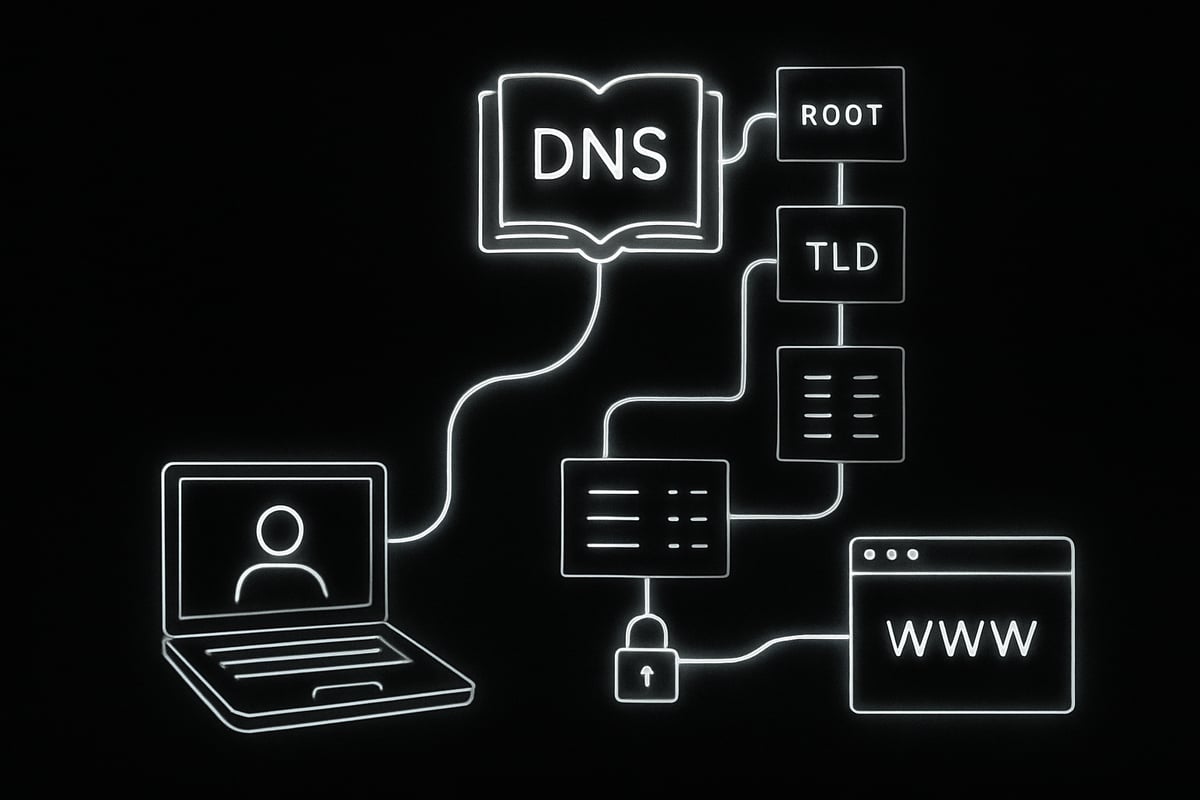
DNS acts as the internet’s phone book, converting familiar addresses like www.example.com into machine-readable IP addresses. When you enter a web address, your device sends a DNS query to a resolver, which searches through a hierarchy of servers to find the correct IP. This hierarchy includes the root server at the top, followed by top-level domain (TLD) servers, and finally the authoritative server that holds the actual record.
Let’s look at an example. When you type www.example.com, your device first checks its own cache. If the answer isn’t there, it asks a recursive DNS resolver, which then queries the root server. The root server points to the .com TLD server, which then directs the request to the authoritative server for example.com. Once the IP address is found, it’s sent back through the chain to your device, connecting you to the website.
Billions of DNS queries like this happen every day, enabling seamless web browsing and app connectivity. But because every internet action starts with a DNS lookup, DNS can also become a bottleneck or a vulnerability. That’s why solutions like a dns proxy are gaining traction to enhance both performance and security.
Types of DNS Servers
DNS servers come in several flavors, each with a unique role in keeping the internet running smoothly. Here’s a quick comparison:
| Server Type | Function | Example Use Case |
|---|---|---|
| Recursive DNS | Finds answers for client queries | Your home router’s default DNS |
| Authoritative DNS | Stores domain records and responds directly | Hosting company’s DNS server |
| Caching DNS | Temporarily saves results for speed | Large organizations, ISPs |
Most internet users rely on recursive DNS servers, which may be managed by their ISP or a third party like Google or Cloudflare. These servers often use caching to respond faster to repeated queries, minimizing wait times for users.
Some providers offer smart DNS solutions designed to unblock geo-restricted content, letting you access streaming services from anywhere. For those interested in the wider world of proxies, you can learn more in this Types of proxy servers explained article, which shows where a dns proxy fits among other proxy technologies.
As the internet evolves, choosing the right DNS setup - including whether to use a dns proxy - can significantly impact speed, security, and content access.
What Is a DNS Proxy? Definition, Types, and Core Functions
Imagine being able to control how your devices connect to the internet, filter unwanted content, and boost performance - all with a single tool. That’s where the dns proxy comes into play. This section will break down what a dns proxy is, the different types you’ll encounter in 2025, and how it operates behind the scenes to make your browsing faster, safer, and more reliable.
DNS Proxy Explained
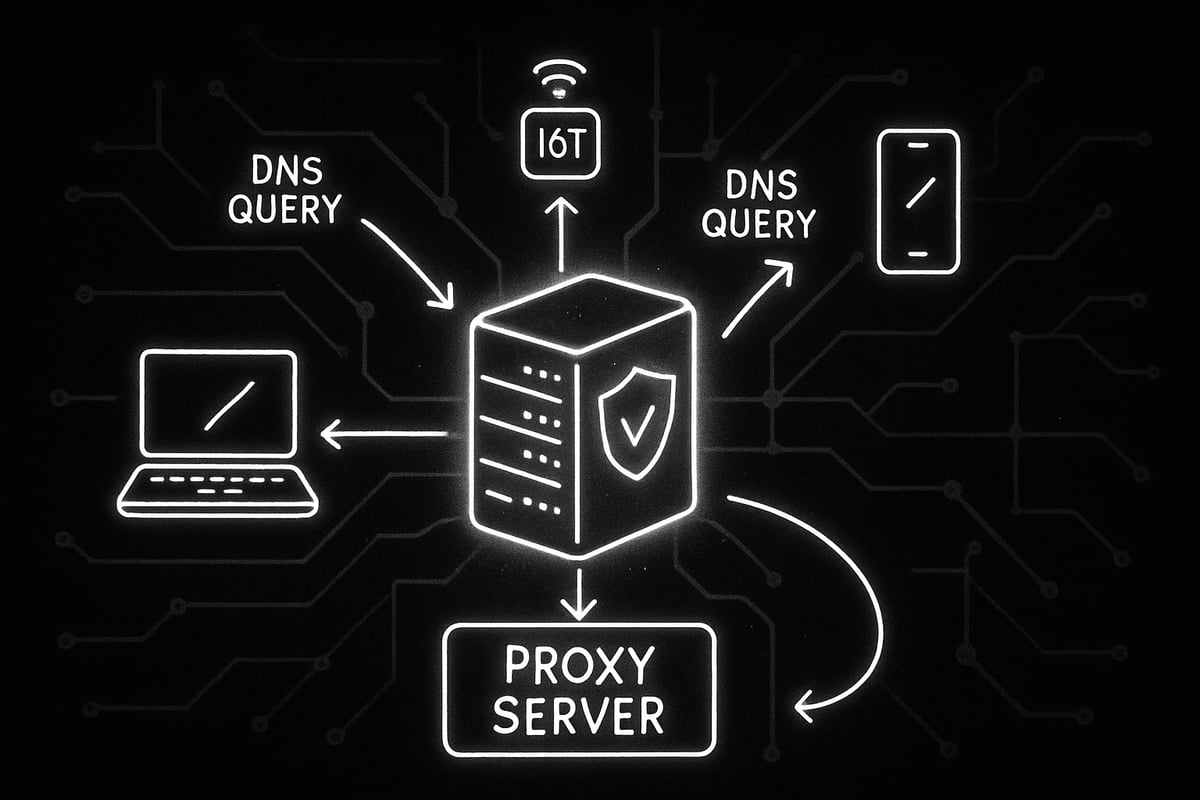
A dns proxy is a specialized server that forwards DNS requests between client devices and DNS servers. Think of it as a smart middleman, sitting between your computer and the wider internet.
Instead of letting every device contact DNS servers directly, a dns proxy intercepts these requests, processes them, and sends them out on behalf of the client. This intermediary role allows it to add features like caching repeated queries, filtering unwanted domains, and enhancing security by hiding client IP addresses.
Businesses and individuals increasingly use dns proxy solutions to optimize network speed, manage access policies, and block threats at the DNS layer. With billions of DNS queries made every day, having a dns proxy in place can transform how efficiently and securely your users connect online.
Types of DNS Proxies
There are several types of dns proxy setups, each with unique benefits.
- Transparent dns proxy: Operates invisibly, intercepting DNS traffic without user configuration.
- Explicit dns proxy: Requires clients to manually set proxy details.
- Forwarding proxy: Directs DNS requests from local clients to external DNS servers.
- Reverse proxy: Handles incoming DNS queries for a specific domain, often used for large-scale hosting.
- Smart DNS proxies: Designed for bypassing geographic restrictions, letting users access content otherwise blocked in their region.
For instance, a smart DNS proxy can let you stream shows from another country by rerouting your DNS queries. If you want to learn more, check out this Smart proxy solutions overview, which dives deeper into how smart proxies unlock content and improve speed.
How DNS Proxies Work
Let’s walk through how a dns proxy operates in practice. When a device sends a DNS query, the request first goes to the dns proxy instead of directly to the DNS server. The proxy can check if it already has the answer cached. If so, it responds instantly. If not, it forwards the request to the appropriate DNS server, receives the response, and passes it back to the client.
This approach brings several advantages:
- Caching: Frequently accessed domains resolve much faster.
- Centralized management: IT teams can update DNS rules once, and all clients benefit.
- Security and filtering: Malicious or unwanted domains can be blocked before reaching users.
For example, an organization might deploy a dns proxy to ensure all its offices follow the same DNS filtering policies, making network-wide changes simple and efficient.
Benefits of Using a DNS Proxy in 2025
Imagine browsing the web and every click feels instant, secure, and unrestricted. That’s the power a dns proxy brings to users and organizations in 2025. Let’s explore the multifaceted benefits that make dns proxy solutions a critical part of modern internet infrastructure.

Speed and Performance Advantages
A dns proxy delivers significant speed gains by caching frequently accessed domains. When you visit a popular website, the dns proxy can instantly respond to your request from its cache, bypassing the need to reach out to external servers every time.
This caching reduces latency and ensures repeated lookups are lightning fast. For global companies, deploying distributed dns proxy servers in various regions results in faster response times for local users. When every millisecond counts, dns proxy implementations help ensure websites and apps load without delay, even during peak hours.
- Cached responses for popular sites
- Lower latency for users worldwide
- Consistent performance across regions
With these advantages, a dns proxy transforms how quickly you can access information online.
Security Enhancements
Security is a top concern in 2025, and a dns proxy is a frontline defender. These proxies can hide user IP addresses, adding a layer of privacy while browsing. They also block access to known malicious or phishing domains before threats reach users.
Advanced dns proxy solutions use threat intelligence feeds to filter harmful content in real time. By monitoring and filtering DNS requests at the network edge, organizations reduce the risk of attacks like DNS spoofing or hijacking. For readers interested in deeper privacy strategies, consider how Residential proxies and privacy can complement dns proxy deployments.
- Masking user IPs for privacy
- Blocking malware and phishing domains
- Filtering unwanted or risky content
These features make the dns proxy a powerful security ally.
Simplified Network Management
Managing DNS settings across hundreds or thousands of devices can be a headache. A dns proxy simplifies this challenge by centralizing DNS configuration and policy enforcement.
IT teams can update DNS settings or security policies in one place, and those changes propagate instantly network-wide. This centralized management reduces manual work, minimizes errors, and saves valuable time for administrators.
- Single point of DNS policy control
- Easy updates and policy changes
- Less manual configuration on endpoints
For organizations seeking efficiency, a dns proxy streamlines complex network operations.
Improved Uptime and Resilience
Network reliability is vital. A dns proxy boosts uptime by performing health checks on upstream DNS servers. If one server becomes unresponsive, the proxy can quickly reroute requests to another, maintaining seamless connectivity.
Even if upstream servers fail, cached records allow the dns proxy to continue serving DNS responses. This resilience ensures users rarely notice disruptions and keeps business operations running smoothly.
- Automatic failover for DNS queries
- Serving cached records during outages
- Enhanced reliability for critical applications
A dns proxy is essential for networks where continuous uptime is non-negotiable.
Support for Compliance and Logging
In regulated industries, tracking and auditing DNS activity is a must. A dns proxy enables detailed monitoring and selective logging of DNS traffic, supporting compliance with security and privacy requirements.
Administrators can choose what to log, helping balance transparency and user privacy. These logs also assist in troubleshooting, audits, and forensic investigations.
- Granular DNS traffic monitoring
- Customizable logging options
- Support for audit and compliance needs
With these capabilities, a dns proxy is ready for modern regulatory demands.
Use Cases and Real-World Applications
The adoption of dns proxy solutions is surging among enterprises, schools, ISPs, and even individual users. Businesses rely on dns proxy tools for network security and performance. Schools use them to filter inappropriate content. ISPs deploy them for better customer experience, while individuals leverage dns proxy services to bypass content restrictions and boost privacy.
Recent statistics reveal a steady increase in dns proxy adoption, especially as organizations prioritize security and simplified management. Whether for safeguarding sensitive data or ensuring fast access to resources, the dns proxy proves its value in diverse real-world scenarios.
DNS Proxy Security: Threats, Protections, and Best Practices
In 2025, securing your network starts with understanding the evolving risks around DNS traffic. As organizations rely more on dns proxy solutions, staying ahead of threats and following security best practices is essential for safe, reliable internet access.
Common DNS Threats in 2025
Threats targeting DNS systems have grown more sophisticated. Attackers exploit vulnerabilities to disrupt service, steal data, or redirect users. Key threats include:
- DNS spoofing: fake DNS responses sent to mislead users
- Cache poisoning: inserting false data into DNS caches
- Domain hijacking: unauthorized changes to DNS records
- DDoS attacks: overwhelming DNS servers with traffic
- DNS tunneling: covert data exfiltration
Any dns proxy implementation must address these risks to prevent downtime and data breaches. Regular threat monitoring is a must.
How DNS Proxies Mitigate Risks
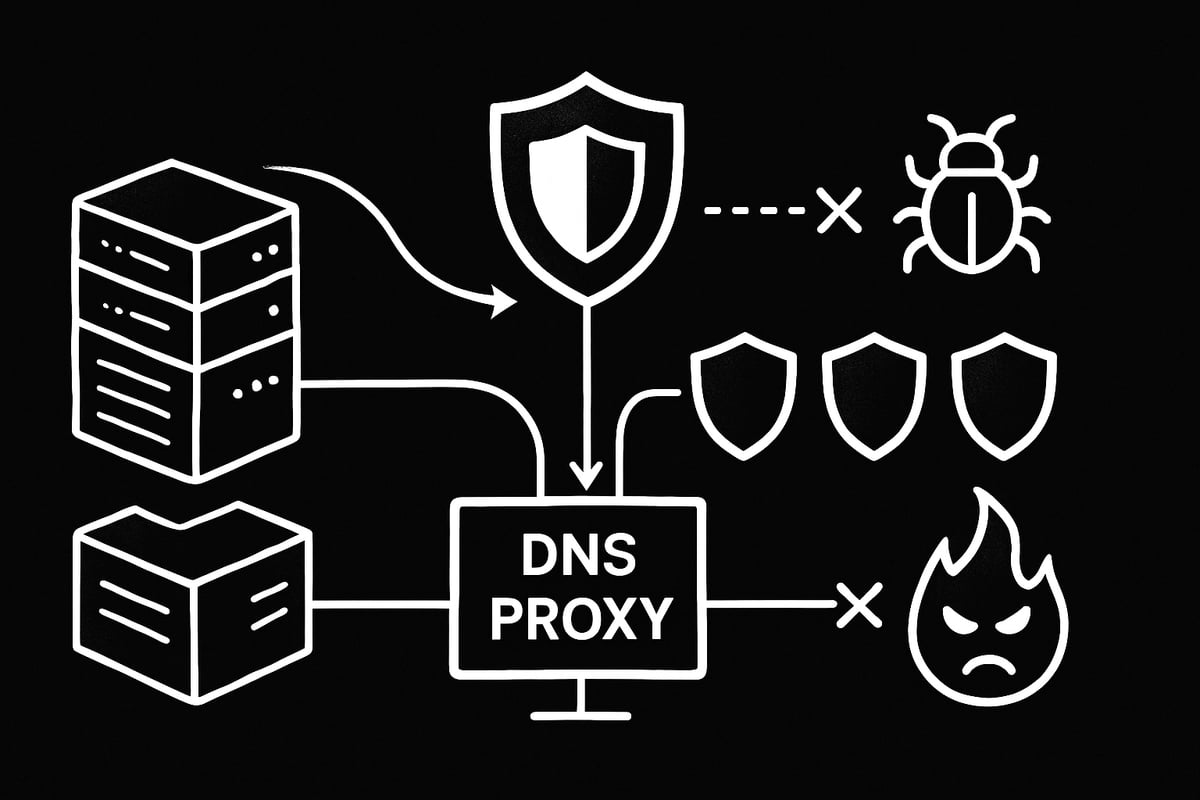
A dns proxy acts as a shield between clients and the open internet, reducing the attack surface. By masking client IP addresses, it protects user identities. Encryption technologies like DNS-over-HTTPS and DNS-over-TLS secure queries against interception.
DNS proxies also block access to malicious domains using threat intelligence feeds. This proactive filtering stops phishing and malware attacks before they reach end-users. With a dns proxy in place, organizations can react quickly to new threats by updating blocklists in real time.
Advanced Security Features
Modern dns proxy solutions integrate with security platforms and firewalls for a layered defense. Real-time monitoring tools detect unusual query patterns or spikes in traffic, signaling potential attacks.
- Automated removal of compromised upstream DNS servers
- Integration with SIEM tools for alerting
- Customizable filtering rules for sensitive or regulated environments
For example, a dns proxy can automatically reroute queries if an upstream DNS server is unresponsive or shows signs of compromise, keeping your network resilient.
Best Practices for Secure DNS Proxy Deployment
To maximize security, follow these best practices for deploying a dns proxy:
- Regularly update and patch proxy software
- Enable DNSSEC validation for authenticating DNS responses
- Monitor logs for suspicious activity
- Restrict access to dns proxy management interfaces
For compliance and technical guidance, refer to the DNS Proxy Implementation Guidelines. Following official standards helps ensure your deployment is both secure and reliable.
Statistics and Industry Data
DNS-related attacks are on the rise. In 2024, over 30% of enterprises reported DNS-based incidents affecting operations. Adoption of dns proxy solutions with advanced security controls has increased by 40% year-over-year.
The trend toward encrypted DNS, centralized monitoring, and proactive threat blocking will continue. Organizations that invest in a robust dns proxy strategy are better equipped to face tomorrow’s cyber threats.
How to Set Up and Configure a DNS Proxy: Step-by-Step Guide
Setting up a dns proxy in 2025 is simpler than you might think. Whether you are optimizing a business network or your home internet, following a clear, structured process helps you achieve the best speed, security, and control. Let’s break down each stage so you can deploy your dns proxy with confidence.
Step 1: Assess Your Network Requirements
Begin by mapping out your current network. How many users, devices, and locations are involved? Are your main goals improving speed, boosting privacy, or accessing restricted content?
Understanding these needs ensures your dns proxy deployment is tailored for success. If you manage a corporate environment, consider compliance and audit requirements. For home users, simplicity and ease of use might be most important.
Create a checklist of your priorities. This will help guide your decisions in the next steps.
Step 2: Choose the Right DNS Proxy Solution
With your requirements in hand, select a dns proxy that fits. Consider if a hardware appliance, software package, or cloud-based service is best. Each option offers distinct advantages:
| Solution Type | Pros | Cons |
|---|---|---|
| Hardware | Reliable, high performance | Costly, less flexible |
| Software | Flexible, scalable | Needs maintenance |
| Cloud-based | Easy updates, remote access | May involve ongoing fees |
Check compatibility with IPv4 and IPv6. If you have remote offices or need rapid scaling, cloud-based options are attractive. For smaller setups, software on a local server may suffice.
Step 3: Install and Deploy the DNS Proxy
Now, install your chosen dns proxy solution. This process varies by platform, but generally includes downloading the software, running the installer, and launching the service.
If you need a detailed walkthrough, you can follow this Downloading and Installing DNS Proxy guide for step-by-step instructions.
After installation, integrate the dns proxy by updating your router or firewall to direct DNS traffic through it. For larger networks, deploy on a central server and configure endpoints to use its IP address.
Test connectivity from a client device to ensure DNS requests route correctly.
Step 4: Configure DNS Proxy Settings
Fine-tune your dns proxy for optimal performance. Set upstream DNS servers - these are the external servers your proxy will query.
Adjust caching and TTL (time-to-live) settings for faster lookups. For example, a basic configuration might look like:
upstream_dns = 8.8.8.8, 1.1.1.1
cache_ttl = 3600
Set up access controls to restrict who can use the proxy. Enable user authentication if sensitive data is handled.
Centralized management makes it easy to update DNS rules or switch providers network-wide.
Step 5: Implement Security and Filtering Policies
Security is vital for any dns proxy. Integrate threat intelligence feeds to block known malicious domains. Set up allow or deny lists for specific content.
Enable DNSSEC validation and encryption (like DNS-over-HTTPS) to protect queries from eavesdropping. Many dns proxy solutions offer built-in filtering modules, so explore these features.
Document your filtering policies for compliance, especially if you manage organizational networks.
Step 6: Monitor and Maintain the DNS Proxy
Ongoing monitoring keeps your dns proxy running smoothly. Set up logging and analytics to track DNS traffic and performance.
Schedule regular health checks to detect issues early. Many solutions provide dashboards or alerts for quick insights.
Update your dns proxy software and threat databases frequently. This ensures you stay protected against new risks and maintain optimal performance.
Step 7: Troubleshooting Common Issues
If you encounter problems, start by checking your logs for errors or unusual patterns. Common dns proxy issues include slow resolution, failed lookups, or upstream server outages.
Troubleshoot by:
- Verifying network connectivity
- Testing with alternate upstream servers
- Reviewing firewall and routing rules
Restore service quickly by switching to backup DNS servers or using cached records. Regularly reviewing logs helps you spot recurring issues and refine your configuration.
DNS Proxy vs. DNS Firewall vs. Other DNS Solutions
Navigating the world of DNS solutions can be confusing, especially when choosing between a dns proxy, DNS firewall, VPN, or Smart DNS. Each technology offers distinct features, and knowing the differences helps you make the right decision for your network.
DNS Proxy vs. DNS Firewall
A dns proxy is mainly responsible for forwarding DNS requests, often improving speed and offering basic filtering or caching. In contrast, a DNS firewall actively blocks access to malicious or unwanted domains, providing an additional layer of security. While a dns proxy helps streamline network management, a DNS firewall focuses more on threat prevention. Many organizations combine both for layered protection, leveraging each tool’s strengths for a comprehensive approach.
DNS Proxy vs. VPN and Smart DNS
When comparing a dns proxy to VPNs and Smart DNS, the differences become clear. A dns proxy is designed for fast, efficient DNS resolution and can help with privacy and management. VPNs encrypt all internet traffic, providing strong privacy but sometimes causing slower speeds. Smart DNS is optimized for unblocking geo-restricted content without the performance hit of a VPN. If you want to understand Smart DNS setup, check out this Setting Up a Smart DNS Proxy Server guide for practical insights.
Choosing the Right Solution for Your Needs
Selecting between a dns proxy, DNS firewall, VPN, or Smart DNS depends on your priorities. For strong security in enterprise environments, combining a dns proxy with a DNS firewall is ideal. If content access is your main goal, Smart DNS or a dns proxy may be best. For privacy across all online activity, consider a VPN. Always assess your needs: do you prioritize speed, security, or content access? Matching the right tool to your scenario maximizes effectiveness.
Industry Trends and Future Outlook
The dns proxy landscape continues to evolve, with more solutions blending proxy and firewall features for all-in-one protection. Encrypted DNS protocols like DNS-over-HTTPS are gaining traction, boosting privacy and security. Market forecasts predict increased adoption of advanced DNS security tools in the coming years. As threats grow more sophisticated, expect the dns proxy to play an even bigger role in securing internet access and management for organizations and individuals alike.
Frequently Asked Questions (FAQ) About DNS Proxies
If you are new to the world of dns proxy solutions, you might have a few burning questions. Here, we tackle the most common queries to help you get a clear, concise understanding of how dns proxy works and why it matters.
What is a recursive DNS server?
A recursive DNS server acts as the middleman between your device and the wider internet. When you type a website address, your request first goes to this server. It then finds the correct IP address by querying other DNS servers, ensuring you connect quickly and accurately. A dns proxy often works closely with recursive DNS servers to streamline lookups and boost performance.
What is an authoritative DNS server?
Authoritative DNS servers store the official records for domain names. When a dns proxy or recursive server contacts them, they provide the final answer for a domain’s IP address. Unlike recursive servers, authoritative DNS servers do not perform lookups for other domains. Instead, they only answer queries about domains they control, making them essential for accurate internet navigation.
What is a smart DNS proxy?
A smart DNS proxy is designed to help users bypass geo-blocks and access restricted content, such as streaming platforms. It reroutes only DNS queries, not all web traffic, which keeps speeds high and latency low. For example, using a smart dns proxy, you can watch your favorite shows even if they are not available in your country, making it a popular tool for global content access.
What are the main threats to DNS servers?
DNS servers face several threats, including:
- DDoS attacks that overwhelm servers
- DNS spoofing, which tricks users into visiting fake sites
- Cache poisoning, where false records are inserted
- Data exfiltration through covert DNS tunnels
A dns proxy can help defend against some of these threats by filtering malicious queries and providing extra security layers.
How does DNS proxy management simplify IT operations?
A dns proxy centralizes DNS policy enforcement and configuration. IT teams can update settings, apply security rules, and manage access for all users from a single dashboard. This reduces manual changes on individual devices, cuts down on errors, and streamlines troubleshooting. With a dns proxy, organizations enjoy more efficient network management and faster response to incidents.
Can DNS proxies be used with IPv6?
Yes, most modern dns proxy solutions support both IPv4 and IPv6 protocols. This dual compatibility ensures your network stays future-proof and can handle the growing number of IPv6-only devices. For practical steps, check out this example for configuring DNS proxy on Huawei routers, which includes IPv6 setup guidance.
Is a DNS proxy right for my organization?
To decide if a dns proxy fits your needs, consider your network size, security requirements, compliance obligations, and performance goals. Organizations needing centralized control, improved privacy, and fast content access often benefit from deploying a dns proxy. Evaluate your current challenges and growth plans to determine if this solution aligns with your IT strategy.Now that you’ve got the full picture on DNS proxies - how they work, why they matter for speed, privacy, and security, and how simple they are to set up - why not take the next step for your own online projects? Whether you’re looking to boost performance, protect your data, or unlock content from anywhere, PinguProxy has you covered with high speed proxies, full IPv4 and IPv6 support, and 24 7 customer care. Ready to experience the benefits firsthand?
Get Started Now
and see how easy it is to take control of your internet experience.