
Proxy Cloudflare Guide: Secure Your Site in 2025
Website security and performance are more critical than ever in 2025. As cyber threats become more advanced, and with site speed directly affecting SEO and user trust, choosing the right solution matters. Many site owners are turning to proxy cloudflare for comprehensive protection and faster load times.
Cloudflare stands out as a trusted leader, powering millions of websites worldwide. Its robust proxy features offer DDoS protection, IP masking, protocol upgrades, and detailed analytics to keep your site safe and optimized.
By leveraging proxy cloudflare, you can shield your website from attacks, improve user experience, and gain valuable insights about your traffic.
This guide will walk you through every step needed to proxy cloudflare for your site in 2025, making sure you achieve maximum security and performance.
Here’s what you’ll learn: how Cloudflare’s proxy works, setup instructions, advanced configurations, troubleshooting tips, and best practices for ongoing protection.
Understanding Cloudflare Proxy and Its Role in Website Security
In today’s digital landscape, understanding how a proxy cloudflare setup works is crucial for keeping your website secure and fast. A proxy acts as an intermediary between users and your web server, filtering and managing traffic. Cloudflare’s reverse proxy service intercepts all incoming requests to your site, providing a protective shield and optimizing performance at a global scale.
A core part of this setup is how DNS records are managed. In Cloudflare, A, AAAA, and CNAME records can be toggled between proxied and DNS-only modes. When you enable proxy cloudflare (the “orange cloud” icon), Cloudflare routes traffic through its network, applying security and speed features. DNS-only records (the “grey cloud”) simply resolve your domain to its origin IP, bypassing Cloudflare’s protections. Here’s a quick comparison:
| Record Type | Proxied Status | DNS-Only Status |
|---|---|---|
| A | Yes | Yes |
| AAAA | Yes | Yes |
| CNAME | Yes | Yes |
| MX, TXT, etc | No | Yes |
Choosing the right proxy cloudflare setting is vital. Proxied records gain security and analytics, while DNS-only records are best for services like email.
Security is where Cloudflare truly stands out. As a reverse proxy, it blocks DDoS attacks, hides your origin server’s IP, and filters malicious traffic before it reaches your site. According to Cloudflare's Global Network Statistics, the network spans over 300 cities and blocks billions of threats daily, making it one of the largest defense systems online.
Let’s look at a simple example. Before enabling proxy cloudflare, a user’s request goes straight to your origin server, exposing its IP. After enabling proxy, the request first hits Cloudflare, which checks for threats, caches content, and forwards safe traffic to your origin. This change protects your real server from direct attacks.
Cloudflare’s Anycast IP system is another key feature. Instead of a single server, proxy cloudflare uses a network of distributed data centers. User requests are routed to the nearest location, reducing latency and improving site speed no matter where visitors are based.
Compliance and privacy are also enhanced by proxy cloudflare. By masking your origin and filtering data, Cloudflare helps you meet GDPR and other regulatory requirements. You retain control over what information is shared and can easily update policies as rules evolve.
For modern web applications, APIs, and SaaS platforms, proxy cloudflare is essential. It ensures uptime, maintains privacy, and delivers the performance users expect. As threats grow more complex in 2025, using a robust proxy solution like Cloudflare is no longer optional, but a best practice for any serious online business.

How Cloudflare Proxy Works: Key Concepts and Features
Understanding how the proxy cloudflare system works is crucial for leveraging its security and performance benefits. Let’s break down the core concepts and features that define Cloudflare’s approach to proxying web traffic.

Proxied vs. DNS-Only Records
In proxy cloudflare DNS management, every DNS record can be set to either “proxied” (orange cloud) or “DNS-only” (grey cloud) status. When a record is proxied, Cloudflare acts as a reverse proxy, intercepting and filtering all requests before they reach your origin server.
The main record types eligible for proxying are A, AAAA, and CNAME. Other records like MX or TXT must remain DNS-only, as proxying these can disrupt email or verification services.
Here’s a simple table to illustrate:
| Type | Name | Value | Proxy Status | Use Case |
|---|---|---|---|---|
| A | @ | 192.0.2.1 | Proxied | Main website |
| CNAME | www | example.com | Proxied | Web alias |
| MX | @ | mail.example.com | DNS-only | Email delivery |
| TXT | @ | verification | DNS-only | Domain verification |
With proxy cloudflare enabled, analytics and security features become available, and your server’s IP stays hidden. DNS-only records bypass these protections, exposing the origin IP.
Common use cases:
- Proxied: Public websites, APIs, admin panels
- DNS-only: Email, domain validation, third-party integrations
Knowing when to use each setting is vital for balancing security and functionality.
Benefits of Proxying Through Cloudflare
The proxy cloudflare model provides robust protection against threats and optimizes performance. Cloudflare’s network mitigates DDoS attacks at scale, with real-world examples showing it can absorb attacks exceeding 100 Tbps. You can read more about these capabilities in Cloudflare's DDoS Protection Overview.
Caching static content at edge locations reduces load times, while protocol upgrades like HTTP/2 and HTTP/3 further enhance efficiency. Universal SSL/TLS encrypts traffic by default, boosting user trust and SEO rankings.
Proxied records unlock Cloudflare’s advanced security suite, including Web Application Firewall (WAF) and Bot Management. Detailed analytics for HTTP/HTTPS requests help you monitor traffic patterns and spot anomalies.
For example, by switching a DNS record to proxied, your site instantly gains access to all these benefits - something DNS-only records cannot provide.
Limitations and Considerations
While proxy cloudflare offers many advantages, there are limitations to consider.
- Only A, AAAA, and CNAME records can be proxied.
- During initial setup, records may show a “pending” state until nameservers update.
- TTL for proxied records is set to “auto” (300 seconds) and cannot be customized.
- Never proxy MX or TXT records, as this disrupts email and verification.
Scenarios to avoid proxying:
- Domain verification for third-party services
- Email delivery (MX, SPF, DKIM, DMARC records)
For more details, check Cloudflare’s official documentation for updates and best practices.
Protocol Optimization and SSL/TLS
One standout feature of proxy cloudflare is automatic protocol optimization. Cloudflare adds support for HTTP/2 and HTTP/3 to proxied records, ensuring faster, more reliable connections.
Universal SSL is enabled by default, issuing certificates for your domains and allowing secure HTTPS connections. Cloudflare also generates HTTPS Service records on the fly, so browsers always connect securely.
These enhancements not only improve load times but also increase SEO scores and user confidence. With proxy cloudflare, your site stays fast, secure, and trusted by visitors.
Step-by-Step Guide: Setting Up Cloudflare Proxy for Your Website in 2025
Setting up proxy cloudflare for your website in 2025 is straightforward when you follow the right steps. This guide will help you secure and accelerate your site with proxy cloudflare, from DNS preparation to advanced security and performance tweaks. Let’s dive in.
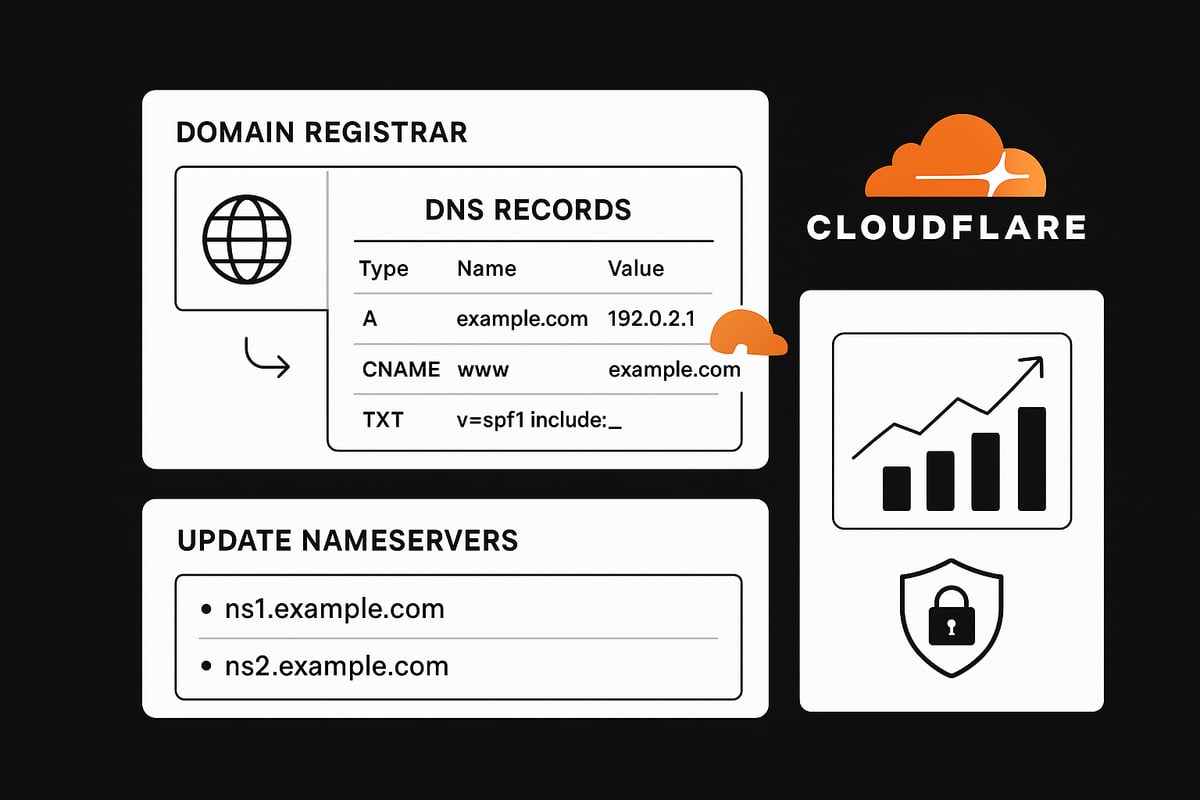
Preparing Your Domain and DNS Records
Before starting proxy cloudflare integration, make sure you have access to your domain registrar and DNS management dashboard. This access is crucial for managing DNS records and updating nameservers.
Checklist:
- Confirm login to your domain registrar.
- Identify all subdomains and services you want to secure with proxy cloudflare, such as www, API endpoints, and admin panels.
- Review existing DNS records for accuracy.
- Back up your DNS zone file before making any changes.
Exporting your DNS zone file ensures you can restore settings if needed. Here’s an example of a simple zone file export:
dig example.com ANY > dns-backup.txt
Understanding the basics of DNS proxies is essential for a smooth proxy cloudflare setup. For a deeper dive into foundational concepts, check out What is a DNS Proxy.
Adding Your Site to Cloudflare
Sign up or log in to your Cloudflare account to begin. Click the “Add a Site” button and enter your domain name. Cloudflare will automatically scan your domain and import all current DNS records.
Carefully review the imported records for accuracy. If you notice missing or incorrect records, add or edit them directly in the Cloudflare dashboard. This step is critical for ensuring that proxy cloudflare works seamlessly.
You’ll see a summary page listing your DNS records, their types, and current proxy status. Double-check that all web-facing records are present and ready for proxy cloudflare configuration.
Configuring Proxy Status for DNS Records
Once your DNS records are imported, set up proxy cloudflare by toggling the orange cloud icon for A, AAAA, and CNAME records you want to protect and accelerate. A proxied record routes traffic through Cloudflare, while a grey cloud leaves it as DNS-only.
Here’s a table for typical DNS record setup:
| Type | Name | Value | Proxy Status |
|---|---|---|---|
| A | @ | 192.0.2.10 | Proxied 🟠 |
| CNAME | www | example.com | Proxied 🟠 |
| MX | @ | mail.provider | DNS-only ⚪ |
Proxy all web-facing records and leave verification or email records as DNS-only. Set TTL to “Auto” or 300 seconds for optimal performance. Configuring proxy cloudflare properly at this stage is vital for analytics and origin IP protection.
Updating Nameservers at Your Registrar
After configuring DNS records, Cloudflare will provide two new nameservers. Updating to these nameservers is required for proxy cloudflare to manage your DNS.
Steps:
- Log in to your domain registrar.
- Locate the DNS or Nameserver settings section.
- Replace your current nameservers with the ones provided by Cloudflare.
- Save changes.
Nameserver updates can take up to 24 hours to propagate. You can monitor progress in the Cloudflare dashboard, where the status will change from “Pending” to “Active” once propagation completes. This transition is mandatory for proxy cloudflare to take effect.
Verifying Proxy Status and Site Functionality
After nameserver propagation, confirm that proxy cloudflare is active. There are several ways to check:
- Use browser developer tools to inspect response headers for
cf-rayorserver: cloudflare. - Run a DNS lookup with
digornslookupto ensure Cloudflare IP addresses are returned. - Check Cloudflare analytics for real-time traffic and security data.
If your site shows a “pending” status, check for DNS propagation delays. For SSL issues or caching problems, clear your browser cache and review Cloudflare’s SSL/TLS settings. Make sure your origin IP is hidden and only Cloudflare IPs are visible. This confirms the effectiveness of proxy cloudflare.
Initial Security and Performance Configuration
Now that proxy cloudflare is live, enable Universal SSL in the Cloudflare dashboard to provide secure HTTPS connections. Set your site to always redirect HTTP to HTTPS for user trust and SEO benefits.
Configure basic firewall rules to block suspicious traffic and enable built-in DDoS protection. Use Cloudflare’s analytics to monitor site speed and security metrics. These initial settings give you immediate protection and performance gains with proxy cloudflare.
Advanced Cloudflare Proxy Configurations for Enhanced Security
Configuring advanced settings in proxy cloudflare takes your site’s security and performance to the next level. By fine-tuning DNS records, leveraging powerful security tools, optimizing protocols, and exploring specialized proxy solutions, you can create a resilient setup tailored to your needs.
Fine-Tuning DNS and Proxy Settings
To maximize proxy cloudflare benefits, carefully mix proxied and DNS-only records. Proxied records (orange cloud) route traffic through Cloudflare, while DNS-only (grey cloud) bypasses it. For root domains, CNAME flattening ensures compatibility with proxy cloudflare. Adjust TTL settings if your infrastructure needs rapid DNS updates.
Example Table:
| Record | Type | Proxy Status | TTL (sec) |
|---|---|---|---|
| www | CNAME | Proxied | Auto |
| api | A | Proxied | 300 |
| MX | DNS-Only | Auto | |
| _acme-challenge | TXT | DNS-Only | Auto |
Use proxied status for all public web services. Keep verification and email-related records DNS-only to avoid disruption. Regularly audit your DNS setup to ensure the correct mix for your use case.
Leveraging Cloudflare Access, WAF, and Bot Management
Enhance proxy cloudflare security using Cloudflare Access, the Web Application Firewall (WAF), and Bot Management. With Access, restrict sensitive areas like admin panels with Zero Trust policies. The WAF blocks threats such as SQL injection and XSS with prebuilt and custom rules. For automated attacks, Bot Management detects and mitigates harmful bots.
For a detailed overview of WAF features and real-world protection strategies, check out Cloudflare's Web Application Firewall (WAF).
Set up firewall rules to block suspicious geolocations or IPs. Create Access policies for APIs or backend portals. Monitor bot analytics to adjust mitigation strategies. These tools work together to create a robust shield for your proxy cloudflare deployment.
Integrating SSL/TLS and Origin Certificates
Securing connections end-to-end is vital when running proxy cloudflare. Use Origin Certificates to encrypt traffic from Cloudflare to your origin server. Choose the right SSL mode - Flexible, Full, or Strict - based on your server’s capabilities. Strict mode with Origin Certificates offers the highest security.
SSL Mode Comparison:
| Mode | Encryption to Origin | Certificate Required | Security Level |
|---|---|---|---|
| Flexible | No | No | Low |
| Full | Yes | Yes (self-signed) | Medium |
| Strict | Yes | Yes (trusted/Origin Cert) | High |
Generate Origin Certificates in the Cloudflare dashboard, then install them on your server. This ensures encrypted traffic throughout, boosting user trust and compliance.
Protocol and Application Optimization
Unlock performance gains with proxy cloudflare by enabling advanced protocol support. Activate HTTP/2 and HTTP/3 for faster, more efficient connections. Brotli compression reduces payload sizes, speeding up page loads. For sites with global audiences, Argo Smart Routing further optimizes latency by routing traffic along the fastest network paths.
Quick Wins:
- Enable HTTP/2, HTTP/3, and Brotli in Cloudflare dashboard
- Turn on Argo Smart Routing for dynamic performance boosts
- Test site speed before and after applying these features
These optimizations work seamlessly for all proxied traffic, making proxy cloudflare a performance powerhouse.
PinguProxy: Advanced Proxy Solutions for Specialized Use Cases
For scenarios where proxy cloudflare does not fit - like web scraping, gaming, or accessing restricted content - consider PinguProxy. It offers high-speed datacenter and mobile proxies with both IPv4 and IPv6 support. Enjoy 1ms proxy rotation, 10Gbps bandwidth, and a strict zero-log policy for privacy-focused applications.
PinguProxy is ideal when you need unlimited access, dedicated support, and specialized capabilities beyond standard proxy cloudflare setups.
Troubleshooting Common Cloudflare Proxy Issues
When using proxy cloudflare to secure your website, encountering occasional issues is natural, especially as your site grows or changes. Knowing how to quickly identify and resolve these problems is crucial for keeping your site fast and secure.
DNS Propagation and Pending Proxy Status
The most common initial challenge is DNS propagation. After you change nameservers or update DNS records to use proxy cloudflare, it can take up to 24 hours for changes to fully propagate worldwide.
During this period, your site may show a "pending" status in the Cloudflare dashboard. To verify propagation:
- Use
digornslookupto check nameserver updates. - Confirm the Cloudflare-provided nameservers are active at your domain registrar.
- Refresh the dashboard after a few hours to see status changes.
If the pending status persists, double-check DNS records for typos and ensure all necessary records are present.
SSL/TLS Errors: Mixed Content and Certificate Problems
SSL/TLS errors are another frequent proxy cloudflare issue. These can appear as browser warnings, "not secure" messages, or failed HTTPS connections.
Common causes include:
- Mismatched SSL certificates between Cloudflare and your origin server.
- Mixed content (HTTP elements on an HTTPS page).
- Incorrect SSL mode (Flexible, Full, Strict).
To resolve:
- Always use Full (Strict) SSL mode if possible.
- Replace all HTTP links on your site with HTTPS.
- Generate and install a Cloudflare Origin Certificate for end-to-end encryption.
For more detailed guidance on SSL proxying and secure connections, see the SSL Proxy and HTTPS Security guide.
Exposed Origin IP and Re-Securing Your Server
One of the core benefits of proxy cloudflare is hiding your origin server's IP address. However, misconfigured DNS records or legacy subdomains can accidentally expose your IP.
To check if your origin IP is public:
- Use online tools or
digto review all DNS records. - Make sure only A, AAAA, and CNAME records for web traffic are proxied (orange cloud).
- Remove or proxy any forgotten subdomains pointing directly to your server.
If your IP is leaked, contact your hosting provider for a new IP and promptly update DNS. For a deeper dive into how proxy addresses help mask your infrastructure, read the Guide to Proxy Server Addresses.
Caching and Content Delivery Issues
Sometimes, users report stale content or missing updates after enabling proxy cloudflare. This is usually due to caching.
To troubleshoot:
- Purge cache in the Cloudflare dashboard after major site changes.
- Set correct cache-control headers on your origin server.
- Use "Development Mode" in Cloudflare for real-time changes.
For dynamic content, consider using page rules to bypass cache where needed.
Third-Party Service Conflicts
Proxy cloudflare can sometimes interfere with email delivery or SaaS verification processes.
Best practices include:
- Keep all MX, TXT, and verification records as DNS-only (grey cloud).
- Avoid proxying ports used for email or non-HTTP services.
- Temporarily disable proxying for verification, then re-enable after completion.
Using Analytics and Logs for Troubleshooting
Cloudflare provides robust analytics and logs to help pinpoint issues.
- Check the "Firewall Events" and "Analytics" tabs for unusual activity.
- Review HTTP status codes and error logs.
- Look for patterns in blocked requests or spikes in threats.
Step-by-Step Troubleshooting Flow
Here’s a quick reference table for resolving common proxy cloudflare issues:
| Issue | Quick Check | Solution |
|---|---|---|
| Pending status | Nameserver/DNS lookup | Wait up to 24h, verify registrar |
| SSL error | Browser, SSL checker | Fix certs, set Full (Strict) |
| Exposed IP | DNS scan | Proxy records, change origin IP |
| Caching problem | Check cache status | Purge cache, adjust rules |
| Email/SaaS conflict | MX/TXT record status | Set DNS-only, verify, revert |
Stay proactive by regularly auditing your proxy cloudflare setup and keeping up with Cloudflare documentation for updates and known issues.
Best Practices and Tips for Securing Your Site with Cloudflare Proxy in 2025
Prioritizing best practices for your proxy cloudflare setup will help you stay ahead of evolving threats in 2025. A well-maintained configuration not only safeguards your site but also ensures top performance and user trust.
Regular Audits and DNS Best Practices
Start by conducting regular audits of your DNS and proxy settings. Check all DNS records in your proxy cloudflare dashboard to confirm the correct proxy status for each entry. Proxied records should cover all public-facing services, while sensitive or verification records remain DNS-only.
Schedule monthly reviews of your DNS zone file. This helps catch accidental exposure of your origin IP or misconfigured records. If you need a broader context on different proxy types and when to use them, the Complete Guide to Proxy Types offers a helpful overview.
Keep a backup of your DNS configurations before making changes. This simple habit can save you from downtime or errors during updates.
Keeping SSL/TLS and Security Features Current
Consistently update your SSL/TLS settings to maintain a secure proxy cloudflare environment. Enable Universal SSL and force HTTPS connections for all proxied domains. Review your certificate validity and renew as needed.
Take advantage of Cloudflare’s latest encryption and protocol features. For a deeper dive into these options, explore Cloudflare's SSL/TLS Encryption Features to understand how Universal SSL, HTTP/2, and HTTP/3 benefit your site.
Stay alert for new security tools and enable Web Application Firewall (WAF) rules to block common threats. Regularly review and update firewall rules to adapt to emerging attack patterns.
Monitoring, Analytics, and Team Education
Monitor your proxy cloudflare analytics dashboard for unusual traffic spikes, geographic anomalies, or failed login attempts. Set up alerts for suspicious activity so you can act quickly.
Empower your team with training on DNS management and the importance of keeping proxy cloudflare settings accurate. Share clear documentation and update access controls to ensure only authorized users can modify records.
Regularly review your analytics and log files. This helps you spot trends, troubleshoot issues, and verify that your origin IP remains hidden behind Cloudflare’s network.
Planning for Scalability and Ongoing Management
Prepare your proxy cloudflare setup for growth and unexpected traffic surges. Enable DDoS protection and rate limiting to keep your site resilient during attacks or viral spikes.
Create a checklist for ongoing management:
- Audit proxy status and DNS records monthly
- Test SSL/TLS and renew certificates proactively
- Review firewall and rate limiting rules quarterly
- Monitor analytics for security events weekly
- Update team permissions and documentation regularly
Stay informed about new features and security advisories from Cloudflare. By following these practices, your proxy cloudflare configuration will remain robust, efficient, and ready for anything the web throws at it.Now that you’ve seen how easy it is to secure and optimize your website using Cloudflare in 2025, you’re ready to take your privacy and performance to the next level. Whether you’re looking to shield your origin IP, speed up your site, or protect against evolving threats, having the right tools is key. If you want even more advanced proxy features - like 1ms rotation, global coverage, and zero logs - PinguProxy has you covered for everything from web scraping to gaming. Why wait to get your site future ready? Get Started Now and enjoy peace of mind today.